All Systems Operational • No known outages across our networkFAQBlogSupportMy Account
Add to any Next Day home plan
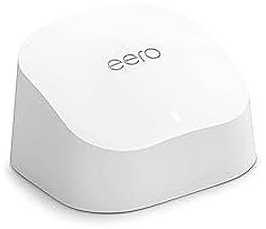
Amazon eero 6
Amazon eero 6
Your mesh Wi-Fi unit
Mesh Wi-Fi

eero 6 Wi-Fi Extender.

Choose the coverage you need. Extra eeros extend your Wi-Fi range but don't increase your broadband speed.

Wi-FiWi-Fi 6
CoverageUp to 1000 sq ft
Devices75+
Ports2 × gigabit
Choose your coverage
1 Wifi ExtenderUp to 1,000 sq ft · flats and smaller homes£8.00/mo
2 Wifi ExtendersUp to 2,500 sq ft · 3–4 bedroom homes£10.00/mo
3 Wifi ExtendersUp to 4,000 sq ft · large homes, thick walls£12.00/mo

For best results, your connection should already be strong near the main router. Coverage depends on your property's layout, walls and eero placement.

Order eero 6
From £8.00/month · no setup fee
6Wi-Fi 6The latest Wi-Fi standard
Up to 1,000 sq ftCoverage from one eero
75+ devicesPhones, TVs and laptops
Set up in minutesStep by step in the eero app
UK support0330 229 6577

Small on the shelf.Strong Wi-Fi in every room.

Plug it in.Every room is covered.

Amazon eero 6
Wi-Fi 6The latest standard
1,000 sq ftCoverage from one eero
75+Devices at once
2 portsGigabit Ethernet
Order eero 6From £8.00/month · no setup fee
In plain English

The eero 6 takes your Wi-Fi to every room.

It connects to your Next Day router and spreads the same Wi-Fi around your home, so the bedroom, kitchen and home office all get a strong signal. It can't fix a weak signal coming into the router, so give your router its best spot first.

Check my address
  1. Add eero 6Added at checkout01
  2. Position your routerIn its best signal spot02
  3. Plug in the eeroPower, then the Ethernet cable03
  4. Wi-Fi in every room75+ devices connected04
Set-up

Up and running in four steps.Step by step in the eero app.

01

Position your router

Give your router the best signal spot. The eero spreads the Wi-Fi, but it can't boost a weak connection coming in.

02

Connect the eero

Plug it into a power socket, then connect it to your router with the Ethernet cable provided.

03

Wait for the light

Solid blue means it's ready to set up. Solid white means it's online and working.

04

Open the eero app

Follow the steps. Reuse your old Wi-Fi name and password so devices reconnect by themselves.

In the box

  • Amazon eero 6Your mesh Wi-Fi unit
  • Power adaptorPlug in and switch on
  • Ethernet cableConnects the eero to your router
  • Support detailsUK team on 0330 229 6577

Need a hand?

Light red? Solid red means it's offline and flashing red means it's resetting. Give it a moment, watch the setup video, or call us.

Call 0330 229 6577
Amazon eero 6

Strong Wi-Fi in every room.1, 2 or 3 extenders.

Choose 1, 2 or 3 Wifi Extenders for coverage up to 1,000, 2,500 or 4,000 sq ft. Coverage depends on your property's layout, walls and extender placement.

  • Wi-Fi 6 for phones, laptops and smart TVs.
  • Two gigabit Ethernet ports for a TV, console or PC.
  • Built-in Zigbee smart home hub that works with Alexa.
BedroomHome officeKitchenLiving room
How many do I need?

Sized to your home.Start small, add more any time.

Small flatEveryday Plus router on its ownNo Wifi Extender needed
1–2 bedroom houseEveryday Plus router on its own to startNo Wifi Extender needed
3-bedroom houseRouter, plus a Wifi Extender if some rooms need better coverage1 Wifi Extender
4–5 bedroom houseRouter plus 2 Wifi Extenders2 Wifi Extenders
Large house or thick walls2–3 Wifi Extenders, depending on the layout2–3 Wifi Extenders

Not sure? Start with the router on its own – you can add a Wifi Extender any time. Call us on 0330 229 6577 and we'll help you work it out.

Product FAQs

Amazon eero 6 FAQs.Answers about eero 6 mesh Wi-Fi.

Still stuck? Call our UK team on 0330 229 6577.

What is the eero 6?

A Wi-Fi 6 mesh router from Amazon. It spreads strong, reliable Wi-Fi around your home, so you get fewer dead spots.

How much does the eero 6 cost?

£8 a month for one, with no setup fee. Two are £10 a month and three £12 a month.

How much space does one eero 6 cover?

Up to 1,000 sq ft. Two cover up to 2,500 sq ft and three up to 4,000 sq ft, depending on layout, walls and placement.

How many devices can I connect?

More than 75 at once, including phones, laptops, TVs, consoles and smart home gadgets.

Does the eero work with my Next Day Broadband?

Yes. It plugs into your Next Day router and boosts the Wi-Fi around your home. Your broadband plan stays the same.

Will an eero make my broadband faster?

It won't change your broadband speed, but it gets that speed to more of your home by improving coverage and reliability.

Is the eero hard to set up?

No. Plug it in, connect it to your Next Day router with the cable, then follow the eero app.

Show all 11 questions

Ready to get connected?

Add whole-home Wi-Fi to your Next Day broadband and get connected in minutes.

Order eero 6

From £8.00/month · no setup fee
Mock-up · Option D · eero 6